Solution · Media rights and distribution CRM

Rightscape: the CRM that knows your rights.

Rightscape is a CRM for companies that license film and television. It follows every title from the first market meeting to the last episode delivered, and because every sale is recorded right by right, territory by territory, it always knows what you can still sell.

  • Distributors and sales agents
  • Studios and producers
  • Broadcasters and platforms
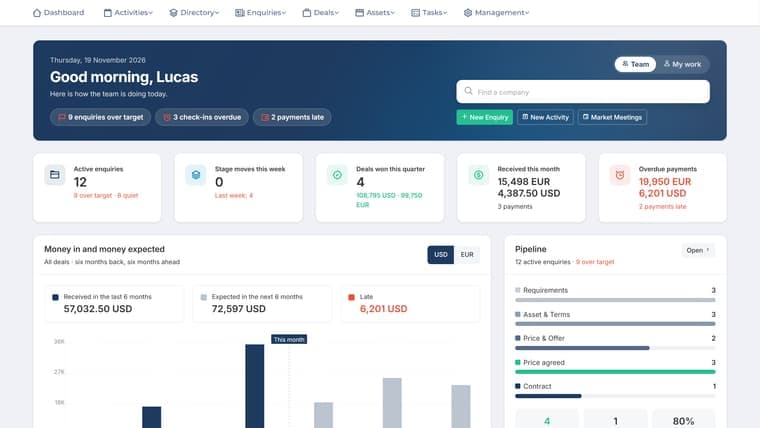
Rightscape team dashboard: alerts for enquiries over target, overdue check-ins and late payments, key figures, money received and expected by month, and the pipeline by stage.
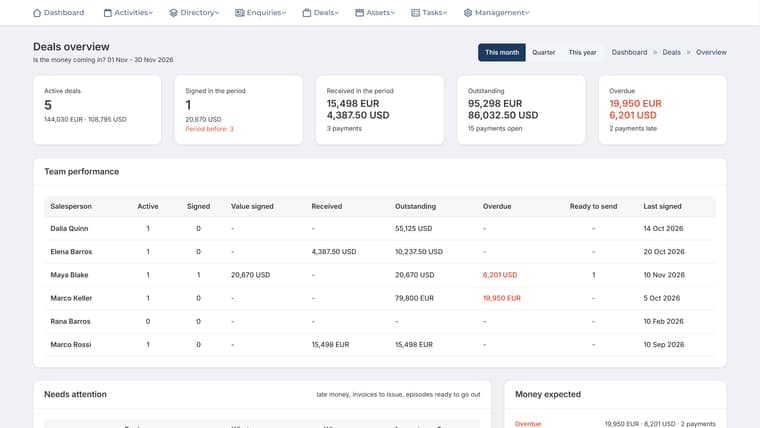
Deals overview for the month: active deals, signed in the period, received, outstanding and overdue per currency, and team performance.

Why a generic CRM falls short

You do not sell a product at a price. You sell rights.

A bundle of rights cut by territory, right type, language, exclusivity, window and runs. One series can be sold ten times in ten territories, and every sale changes what is left. A pipeline with an amount field cannot hold that, so teams fall back on spreadsheets, email threads and memory.

  • A generic CRM: One product, one price, one "amount" field

    With Rightscape: Rights per title, territory and right type, with exclusivity, windows, runs, languages and holdbacks

  • A generic CRM: A spreadsheet to guess what is still available

    With Rightscape: Acquired rights, sales and holdbacks on one timeline, and a check that stops an oversold exclusive

  • A generic CRM: Deal stages picked from a menu

    With Rightscape: Four guided stages with targets in days, stage clocks and a history nobody can rewrite

  • A generic CRM: Offers and counter offers lost in email threads

    With Rightscape: Every version kept in order, and a branded PDF offer in one click

  • A generic CRM: Paid once, delivered whenever

    With Rightscape: Prices per episode, instalments, and episodes released as the money arrives

  • A generic CRM: Quiet enquiries forgotten until it is too late

    With Rightscape: Follow-up rules, counted tries and manager alerts that make silence visible

Who it is for

Built for the people who buy and sell rights

Anyone who licenses film, series, documentaries and formats, and needs to know what they hold, what they sold and until when.

  • Distributors and sales agents

    Licensing film, series, documentaries and formats to broadcasters and platforms around the world.

  • Studios and producers

    Selling their own catalog internationally, title by title and territory by territory.

  • Broadcasters and platforms

    Buying and selling rights, and knowing which windows they hold and when they end.

  • Acquisition teams

    Tracking what they bought, from whom, for which territories and until when.

One system, end to end

From the market meeting to the last episode delivered

Every step of a rights sale lives on the same record, so sales, accounting and the materials team work from one truth.

  1. Market meeting
  2. Requirements
  3. Asset and terms
  4. Price and offer
  5. Contract
  6. Deal and payments
  7. Deliveries
Guided stages from enquiry to signed contract
4
Roles that match a distribution company
5
Interface languages, English and Turkish
2

Chapter 1 · Sell

A sales process built around the way rights are really sold

A guided pipeline, offers in versions and follow-up that never lets a buyer go quiet unnoticed.

Enquiry pipeline

A guided pipeline in four stages

An enquiry is not a status picked from a menu. It moves through Requirements, Asset and Terms, Price and Offer, and Contract, each with its own steps and a target in days. The salesperson always knows the next move; the manager always sees where each enquiry really is.

  • Requirements: the buyer’s need in their own words, the titles shown with their reaction, and every screener link sent, down to the episode
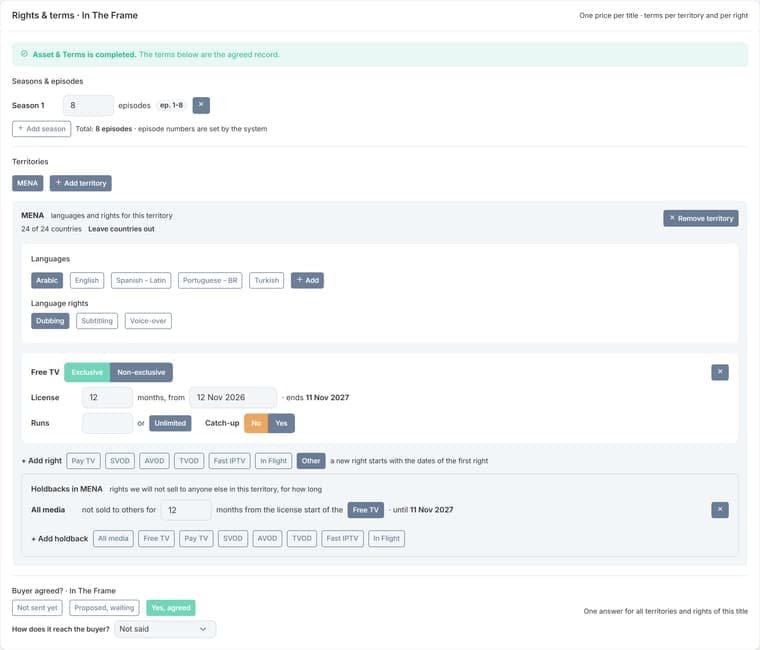
  • Rights and terms per title, per territory and per right: exclusivity, license window, runs, catch-up, languages and holdbacks with their end dates calculated
  • Territories your way: Worldwide, a region or a country, and countries left out, such as "MENA excl. Algeria"
  • A catalog check while you type warns when a term falls outside your rights or overlaps an exclusive sale
  • Contract drafts in versions, both signature dates and the signed PDF, then convert to a deal in one step
  • Stage clocks such as "day 8 of 10", and around 30 search filters on the enquiry list
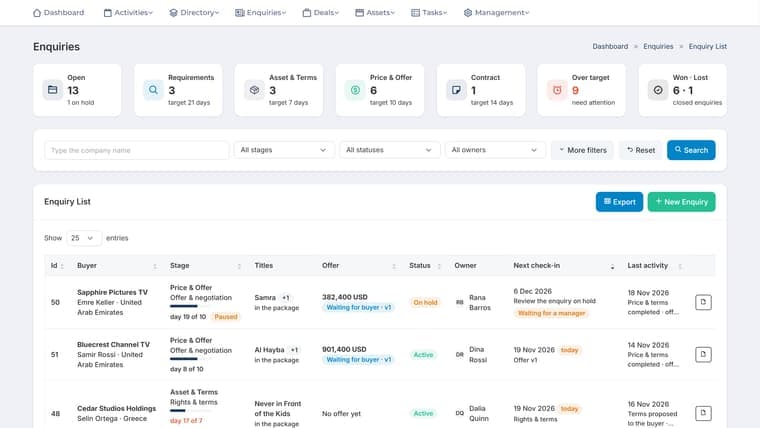
Enquiry list with a tile per stage and its target in days, search filters, and a row per enquiry with the buyer, contact and country.
Rights and terms for one title: season and episodes, the MENA territory with its languages and language rights, Free TV exclusive for 12 months with runs and catch-up.

Offers and the PDF offer

Every offer and counter offer, kept in versions

The offer is where money is decided, so every version is kept and every number adds up. When the price is agreed, the offer becomes a document your buyer is happy to receive.

  • Price and material fee per episode, a single payment or instalments with a down payment, totals per currency as you type
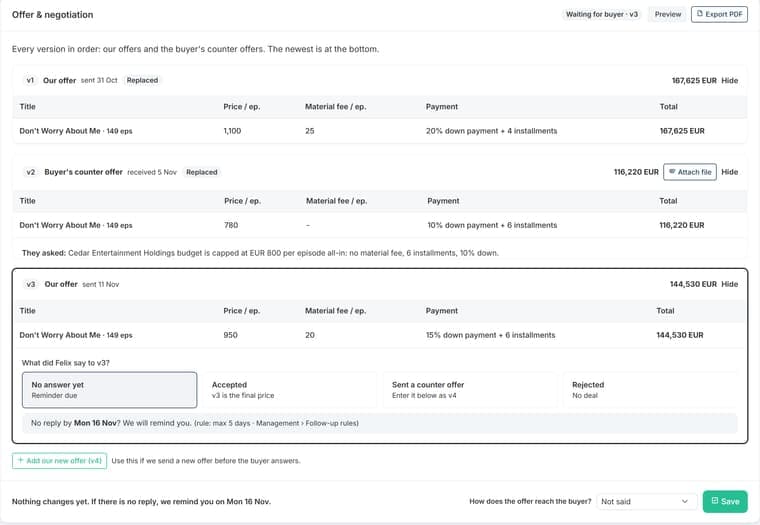
  • Your offer v1, the buyer’s counter offer v2 with their file and what they asked for, your v3, with the accepted version marked
  • A "valid until" date on every offer from your own rules; an open offer past its date is marked expired
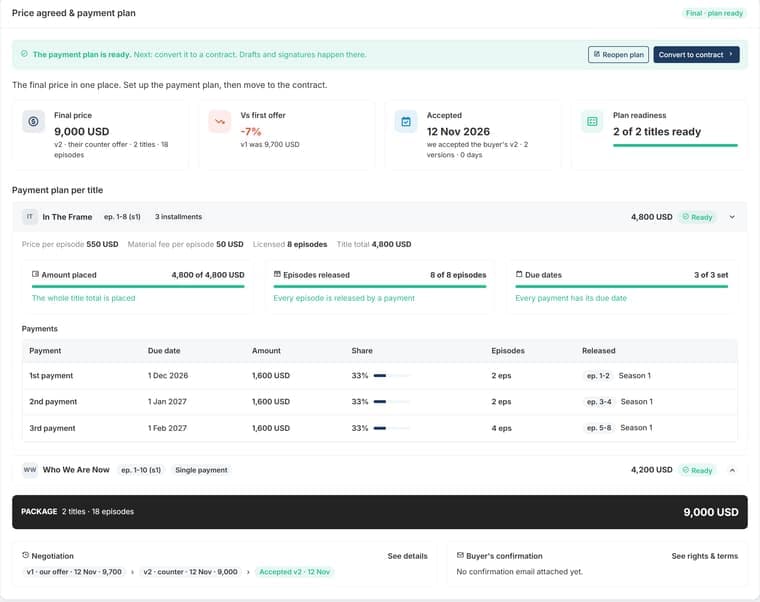
  • A payment plan from the accepted offer: due dates, the share of the total and the episodes each payment releases
  • A designed, branded A4 offer document made on the server in one click, always the latest offer
Offer and negotiation: three versions in order, with the buyer’s budget note on the counter offer and the reply options for the newest offer.
Payment plan from the agreed price: per title, the price and material fee per episode, the instalments and the amount placed.

Follow-up and the manager view

Silence made visible

Most lost deals are not lost on price; they go quiet. Every active enquiry has exactly one next check-in, the waiting times come from rules your managers set, and the system counts the unanswered tries for you.

  • Follow-up rules per situation, such as no reply to links, waiting for budget or offer sent, plus stage targets in days
  • One next check-in per active enquiry, shown on the enquiry, the list, the dashboard and the calendar
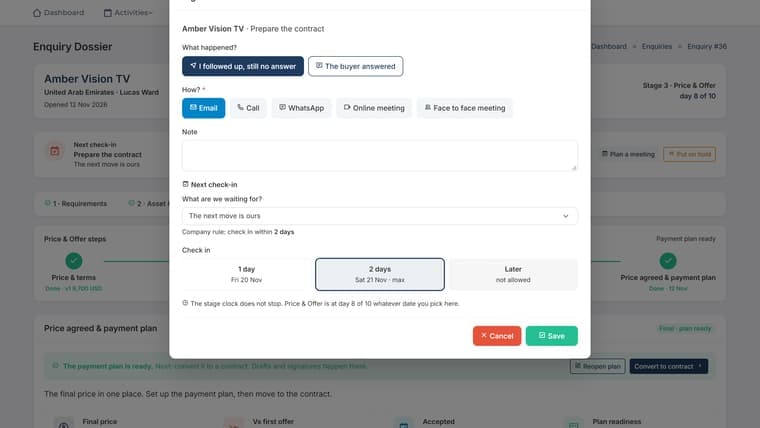
  • Log a contact in one click; after a set number of emails it suggests another channel, then asks for a decision: on hold or lost
  • A check-in beyond the limit waits for a manager’s approval
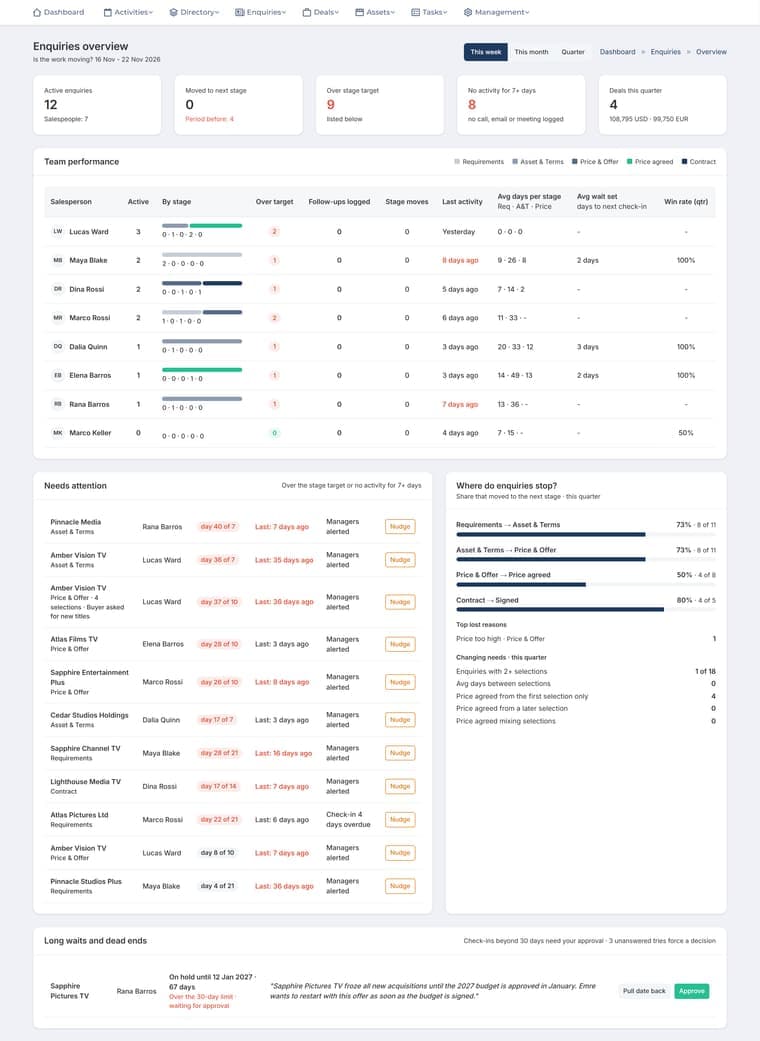
  • A manager overview: over target, no activity for 7 days or more, where enquiries stop between stages, top lost reasons and how buyers’ needs change
Enquiries overview for managers: active enquiries, stage moves, enquiries over target, team performance per person and where enquiries stop between stages.
Log contact panel on an enquiry: the next check-in, the tries so far by channel and the choice between still no answer and the buyer answered.

Chapter 2 · Rights and money

Know what you can sell. Get paid for what you deliver.

The catalog, the rights you hold and every sale meet on one timeline, and deliveries follow the money.

Catalog and rights availability

It always knows what you can still sell

For every title, Rightscape keeps what you acquired, the materials you hold for each episode and everything you sold. From that it answers the first question every buyer asks: is it available?

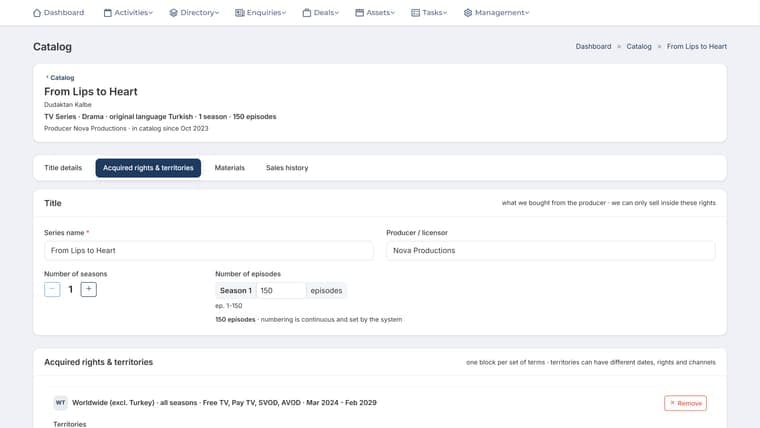
  • Title details: original and international title, seasons and episodes, genres, synopsis, cast and credits, images, trailers and preview links
  • Acquired rights per title: territories and countries left out, seasons, rights with exclusivity, license dates, authorized channels and the contract PDF
  • Materials per episode: masters, M&E, dubbed audio, subtitles, scripts, cue sheets, trailers and key art, with what is missing or coming
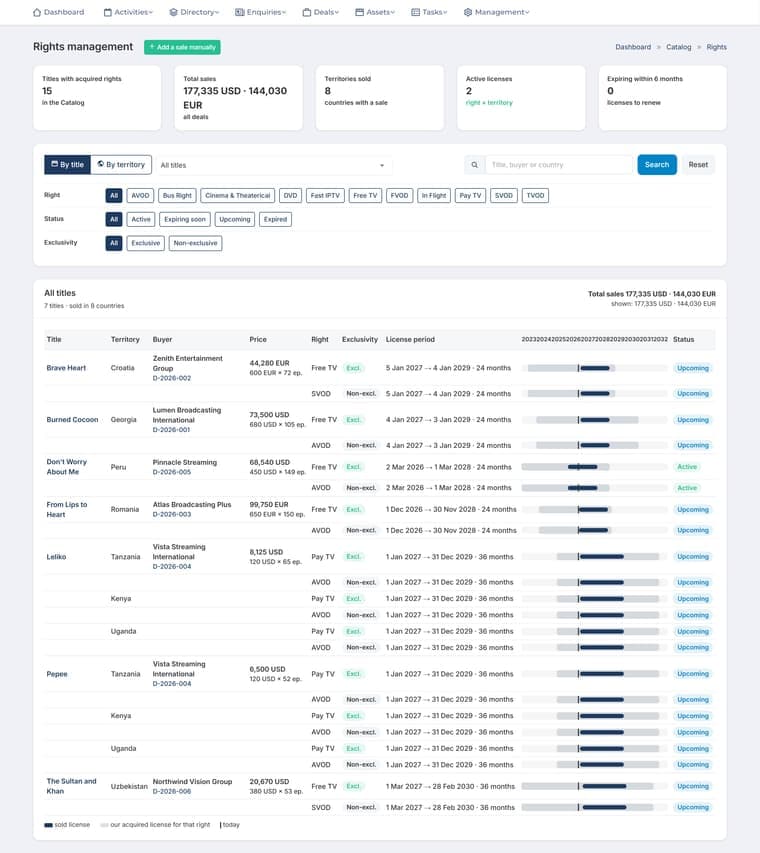
  • Every sale by title or by territory on one timeline, the sold license drawn over the license you hold
  • A rights check that refuses a sale outside your rights or overlapping an exclusive one
  • License-end reminders at 6 months and at 30 days, for the licenses you sold and the ones you bought
  • The titles, synopses and images feed your public website catalog from the same place
Rights management: titles with acquired rights, total sales, territories sold and active licenses, with filters by right, status and exclusivity.
Catalog record of a drama series with tabs for title details, acquired rights and territories, materials and sales history.

Deals, payments, invoices and deliveries

Episodes follow the money

A signed deal is where accounting and the materials team take over. Each team has its own actions on the same deal and the others see what changed, so episodes are never sent before they are paid for, unless someone decides they should be and says why.

  • A deal record with its own copy of titles, seasons, territories, languages, rights and holdbacks
  • Invoices in each contracting entity’s own number series; full or partial payments confirmed with the date and amount received
  • Invoice reminders before a payment is due, and overdue alerts to the salesperson and accounting
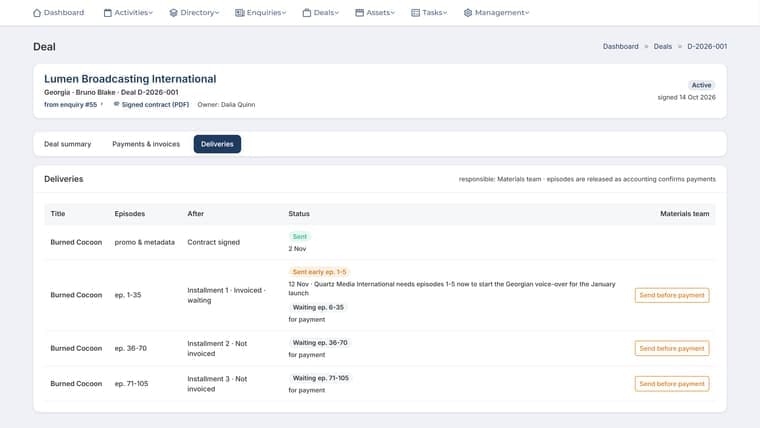
  • Promo and metadata on signing, then episodes released in proportion to the money received
  • Send before payment only with a written reason, and a notice to the sales manager and accounting
  • A deals overview: signed, received, outstanding and overdue, money expected by month, figures per entity and titles sold
Deal with its signed contract and deliveries: promo and metadata on signing, then episodes released as each instalment is paid.
Deals overview for the month: active deals, signed in the period, received, outstanding and overdue per currency, and team performance.

Chapter 3 · The team

Everyone on the same page, every day

A dashboard for each person, a team log that writes itself, and the full picture of every buyer.

Dashboard

The day at a glance

Everyone opens the CRM to their own day, and managers to their team’s. The page appears at once and fills itself part by part, so nobody waits for the slowest number.

  • Today’s alerts: enquiries over target, check-ins overdue or due today, late payments and licenses ending within 30 days
  • Key figures: active enquiries, stage moves this week against last week, deals won this quarter, money received and overdue
  • Money in and money expected, six months back and six ahead, per currency, never mixed or converted
  • Pipeline by stage with the win rate, My day, and a ranked Needs attention list
  • A team table per salesperson: active enquiries by stage, over target, won, lost, win rate and last activity
Team dashboard with the welcome band and today’s alerts, key figures, money in and expected by month, and the pipeline by stage.
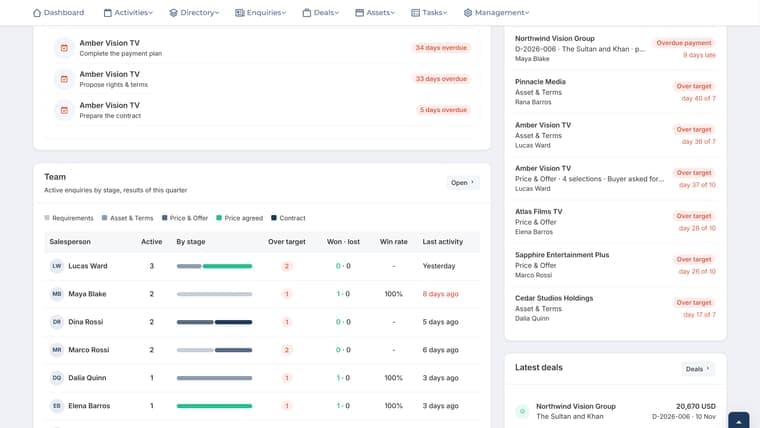
Dashboard team table and needs attention list: each salesperson’s enquiries by stage, win rate and last activity, and late money ranked.

Activities, calendar and market meetings

A team log that writes itself

Rights are sold over months, across markets and time zones. Every real move of an enquiry or a deal becomes an activity on its own, so the history is complete without anyone typing it twice.

  • A team log with filters by period, person, company, type, enquiry and meetings only
  • Calls, emails, meetings and notes you add yourself, each with a next follow-up
  • My calendar: activities, tasks, check-ins, payments due, leaves, market events and deadlines in one month or list view
  • Market meetings: book 30-minute slots at a trade market, see colleagues’ free slots, export the agenda and start an enquiry from a meeting
  • Personal task lists, project boards and notifications in the header
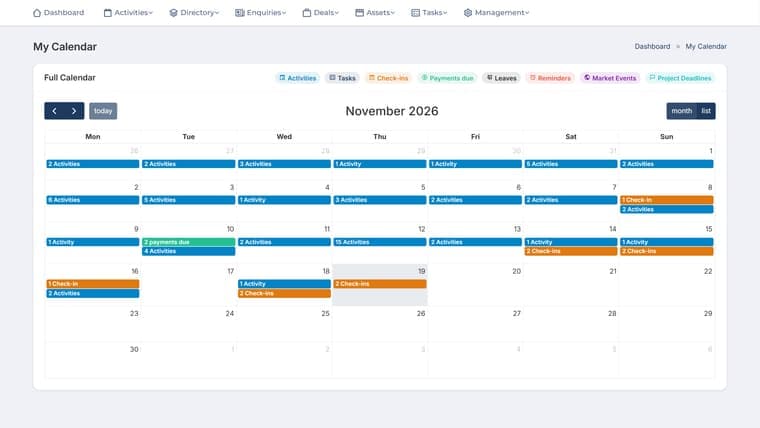
My calendar for November with activities, check-ins, tasks and payments due on each day.
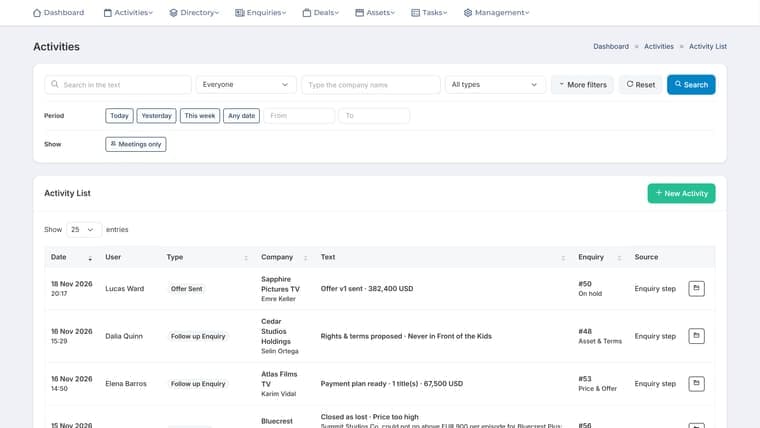
Team activity log with date, person, type, company, what happened and the enquiry stage, with filters.

Companies and contacts

Know the buyer before you pitch

Which group owns them, which countries they broadcast to, what business they are in, what you already sold them and who you talked to last: all on one profile.

  • Company profiles with business activities, broadcasting countries, subsidiaries, and the holding group with share percentages
  • Official and invoicing details, with live counts of activities, enquiries and deals
  • Contacts, the activity timeline, enquiries and deals for each company in tabs
  • A directory with filters by country, region, continent and engagement, and type-ahead company search everywhere
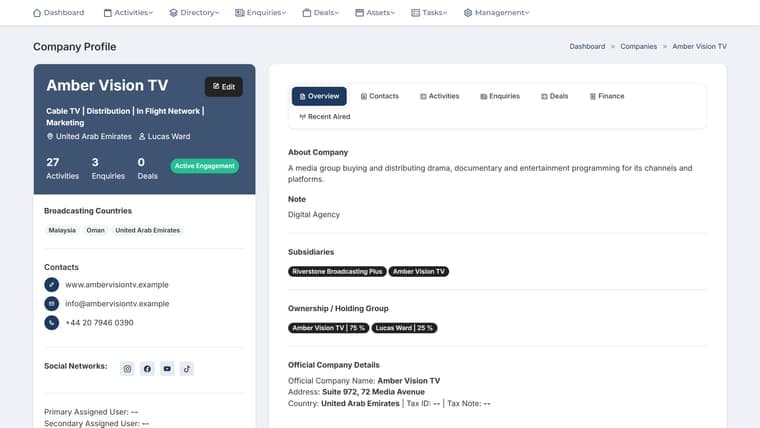
Company profile of a broadcaster with business activities, country, owner, counts of activities, enquiries and deals, and tabs for each.
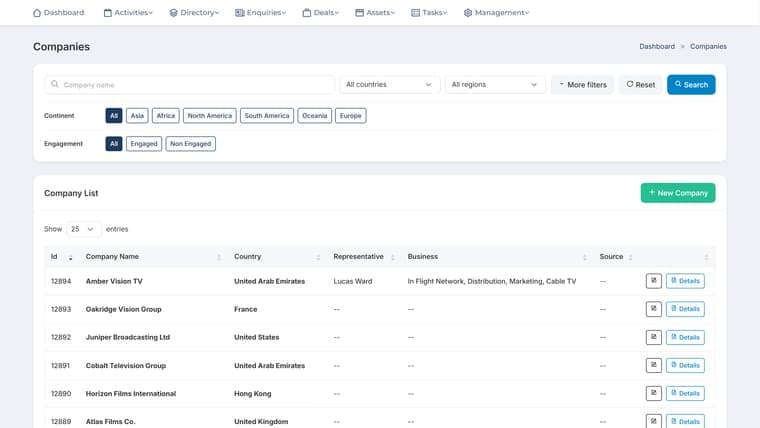
Company directory with filters by country, region, continent and engagement.

Chapter 4 · Control

Built for international teams, private by default

Two languages side by side, roles that match a distribution company, and an AI assistant that respects them.

English and Turkish

Every person works in their own language

Each person picks their language in the header and the CRM remembers it. Every screen, message and notification is available in English and Turkish, while documents for buyers stay in English.

  • The full interface in English and Turkish, switchable per person at any time
  • Texts written by the system, such as activity titles and notifications, appear in the reader’s language
  • Dates follow the language; more languages on request
  • Light and dark mode
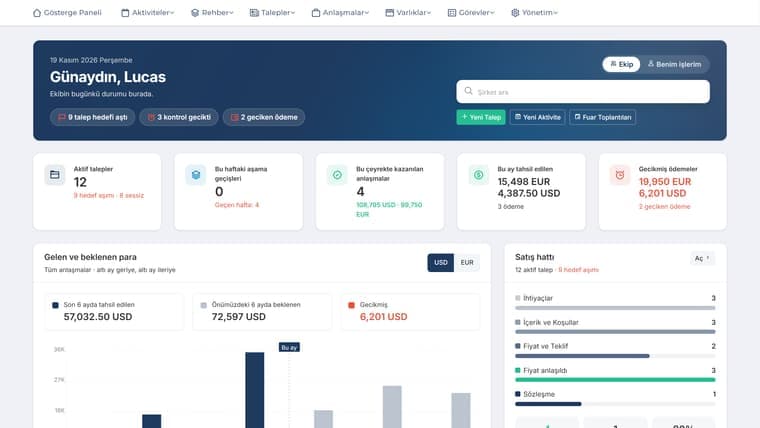
The Rightscape dashboard in Turkish, with the same alerts, figures and pipeline.

Security and roles

Each role sees what its job needs

Your catalog, prices and buyers are your business. Nothing is visible without signing in, and every record keeps who created it and when.

  • Sign-in required for every page and every data call
  • Roles that match a distribution company: administrator, manager, salesperson, accounting and materials team
  • Salespeople see their own enquiries and deals; managers, accounting and the materials team see all deals
  • Every change checked against forgery; nothing changes just by opening a link
  • An append-only progress log on every enquiry
  • Lookups you control: content types, genres, right types, languages, delivery types, market events, legal entities and currencies
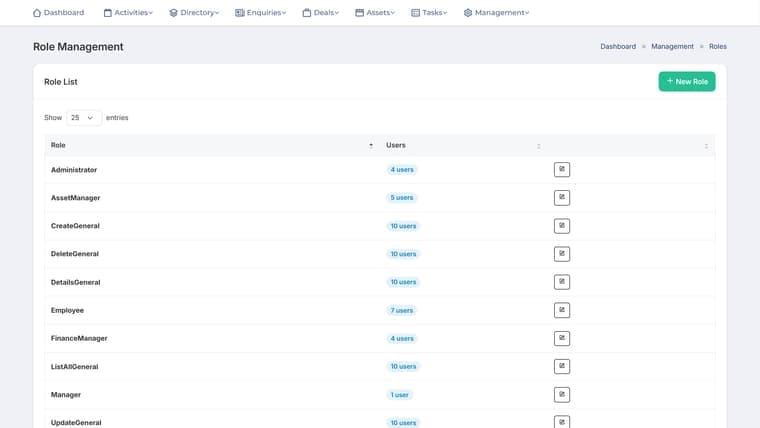
Role management list with each role and the number of users who hold it.

AI assistant

Your CRM inside Claude

Ask in plain words and get answers from your own data. Rightscape includes a connector (MCP) for Claude, and Claude sees only what that person may see in the CRM.

  • Tools for companies, contacts, enquiries, deals, the catalog and rights, with the same search filters as the screens
  • Each person signs in and approves with standard OAuth and PKCE
  • Access ends at once when a user is locked, removed or changes their password
  • Each person, and administrators for everyone, can see and disconnect the apps they allowed
  • Which of our titles are sold in MENA, and when do the licenses end?
  • What is open with this broadcaster?
  • Which enquiries are over target this week?

Why it is different

Made for rights, not adapted to them

What a distribution team gets that no generic CRM can give it.

  1. Built around rights, not products

    Title, territory, right, window, exclusivity, language, runs and holdback are the core of the data, not custom fields.

  2. It knows what you can still sell

    Acquired rights, sales and holdbacks meet on one timeline, and the rights check stops you before you oversell an exclusive.

  3. Episodes are money

    Prices per episode, payment plans that release episodes, and deliveries that follow the cash.

  4. A process, not a status

    Four stages with targets and clocks, one next step at all times, and a history nobody can rewrite.

  5. Made for the market calendar

    Market meetings, agendas and enquiries that start from a meeting.

  6. Multi-entity and multi-currency

    Sell through any entity of your group, each with its own invoice series; money is always shown per currency, never silently converted.

Integrations

Connected to the tools around your deals

Rightscape works with the AI, mail, signature, transfer, accounting and reporting tools distribution teams already use.

Claude (AI assistant, MCP)
Search and read the CRM from Claude with each person’s own permissions.
PDF offer documents
Offers produced as A4 PDFs on your own server, with no third-party service.
Your public catalog website
Titles, synopses, images and gallery kept in the CRM, stored where the website reads them.
Google Workspace and Microsoft 365
Sign in with Google or Microsoft, log mail threads to companies and enquiries, keep contracts in Drive.
Google Calendar and Outlook
Market meetings, check-ins and planned meetings in each person’s calendar, both ways.
Zoho Books, QuickBooks and Xero
Invoices issued in the CRM and payments received kept in step with your books.
DocuSign and Adobe Acrobat Sign
Send the final contract for signature; the signed PDF and dates come back to the contract stage.
Aspera, Signiant and MediaShuttle
Episode batches sent through your transfer service, marked as sent in the deal when the transfer completes.
Vimeo and Frame.io
Private screener links per title and episode, with views back in the enquiry.
WhatsApp Business
Send screener links and follow-ups from the enquiry, logged as activities.
Slack and Microsoft Teams
Alerts for check-ins due, overdue payments and licenses ending in your team channels.
TMDB and IMDb
Fill title details such as synopsis, cast and crew from a public database, within their data license.
Power BI and Looker Studio
Your sales, rights and payment data in your own BI dashboards.
Exchange-rate feed
Optional combined totals across currencies at the day’s rate, next to the per-currency figures.

Technology

A web application your team opens and uses

  • Nothing to install for users: Rightscape runs in the browser
  • Built on .NET 8 and Microsoft SQL Server
  • Light and dark mode, in English and Turkish
  • Private by default, with roles, protected changes and a history you can trust

FAQ

Rightscape: common questions

Who is Rightscape for?

Distributors and sales agents licensing film, series, documentaries and formats; studios and producers selling their own catalog; broadcasters and platforms that buy and sell rights; and acquisition teams tracking what they bought, for which territories and until when.

How does Rightscape stop us from overselling rights?

It keeps the rights you acquired and every sale you made, right by right and territory by territory, on one timeline. While you enter terms it warns when they fall outside your rights or overlap an exclusive sale, and a manual sale outside your rights is refused.

Can it handle prices per episode and payments in instalments?

Yes. Offers are priced per episode with material fees, as a single payment or instalments with a down payment. The accepted offer becomes a payment plan, and episodes are released to the buyer in proportion to the money received.

Which languages does Rightscape support?

The full interface is in English and Turkish, chosen by each person. Texts written by the system appear in the reader’s language, documents for buyers stay in English, and more languages are available on request.

Can our team ask Claude about our sales and rights?

Yes. Rightscape includes an MCP connector for Claude. Each person signs in and approves with OAuth, Claude sees only what that person may see in the CRM, and access ends at once when the user is locked or removed.

See Rightscape on a catalog like yours

Tell us how you sell rights today, and we will show you the CRM running enquiries, offers, rights and deliveries end to end.